

How backups and restores work
synsmarts protects different data with different recovery mechanisms, because each kind of data fails in a different way: a database loses records through bad writes and migrations, while media loses individual objects through overwrites and deletions. That’s why a database recovery point can’t replace a missing media object, and a media version doesn’t restore database records.
Database protection
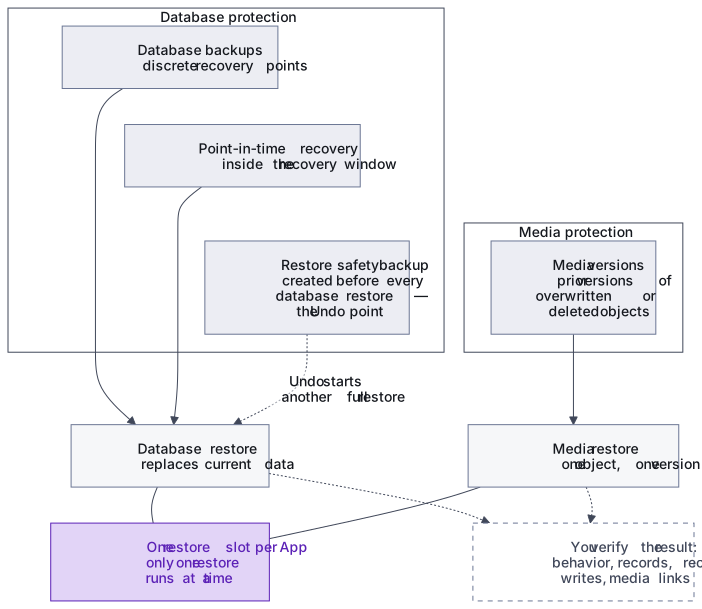
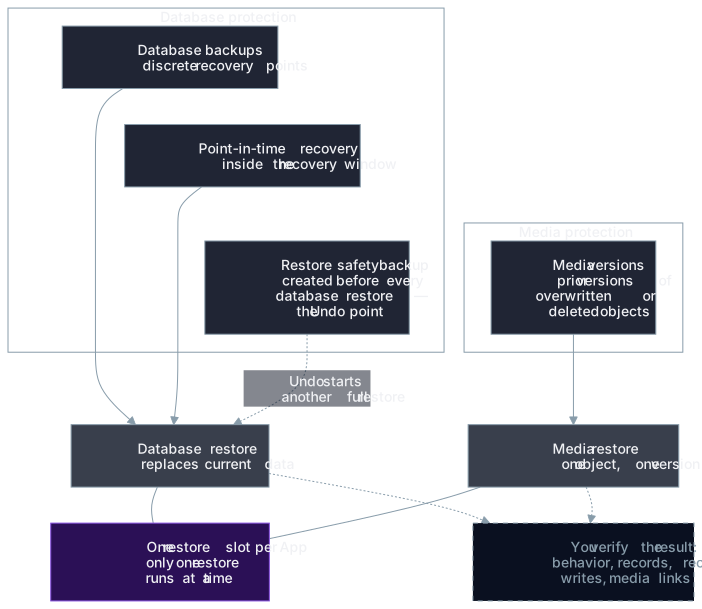
Section titled “Database protection”Database backups provide discrete recovery points. Point-in-time recovery can restore the database to an eligible timestamp inside the available recovery window. Apps on MariaDB restore whole database backups; point-in-time recovery is available on Apps running Percona Server for MySQL.
Before a database restore, synsmarts creates a safety backup of the current database. After completion, that backup appears as the restore’s Undo point; selecting Undo starts another full restore from it.
Media protection
Section titled “Media protection”Media storage keeps prior versions of overwritten or deleted objects for the displayed retention period. A media restore selects one object and one eligible version; it doesn’t roll the whole media store back.
Restore operations replace current data
Section titled “Restore operations replace current data”A restore is a managed App operation. Only one restore can run for an App at a time: database and folder restores share the same restore slot, so a long folder restore can delay an urgent database restore. The portal shows progress and preserves the result for later review.
Database restores can briefly interrupt application access. Media restores normally affect only the selected object.
Verification is part of recovery
Section titled “Verification is part of recovery”A completed operation means the recovery workflow finished. You must still verify application behavior, record counts, recent writes, media links, and external integrations.
The Backups page reports the last observed protection state. A stale status isn’t proof that protection is absent, but it must be investigated before relying on that recovery point.
See Backup types and retention and Manage backups.