

How resources and usage relate
Resource settings and usage measurements describe different layers of the same App. A safe sizing decision starts by keeping those layers separate.
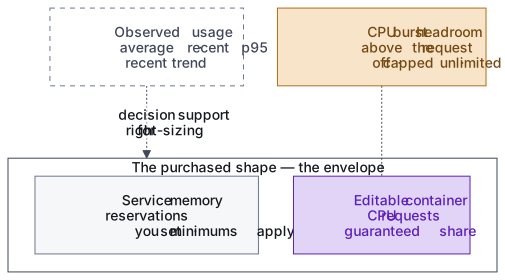
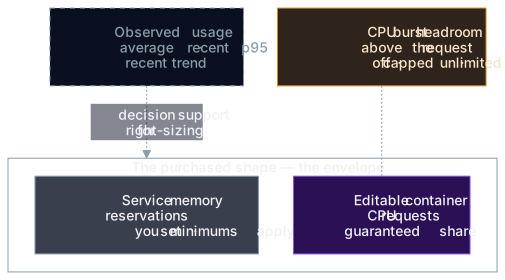
Your bill has two parts: the purchased shape is reserved capacity with a fixed monthly base, while usage above it is metered. The five views below connect that reserved plane to the metered plane without treating them as the same quantity. See How usage becomes cost for the free allowance and overage rules.
Five resource views
Section titled “Five resource views”| View | What it answers |
|---|---|
| Purchased shape | What capacity did the Team buy and what is the billing envelope? |
| Service reservation | What memory is guaranteed for a reservable service? |
| Dynamic headroom | What memory remains for the dynamic workloads? |
| CPU burst setting | How far can a container run above its CPU request? |
| Observed usage | What did the workload actually consume during a stated window? |
The purchased shape covers CPU, memory, MySQL storage, workspace storage, and media storage; an App with a provisioned RabbitMQ broker also pays for its storage, including while the broker is suspended. Memory first covers platform costs, service reservations, and dynamic-workload floor requests. The remainder stays unallocated as dynamic headroom. Storage dimensions are provisioned independently.
The shape is an envelope, not a utilization target
Section titled “The shape is an envelope, not a utilization target”The shape is both the commercial purchase and the enforcement envelope for customer workloads. Service reservations and platform workload floors must fit inside it.
You don’t need to drive average utilization to 100%. Headroom is useful for:
- traffic variation;
- deploys and restarts;
- imports;
- cache warm-up;
- supported in-container burst;
- future configuration changes.
Low average usage is a signal to investigate, not automatic proof that the shape is too large.
Two memory classes share the purchased shape
Section titled “Two memory classes share the purchased shape”Reservable services are MySQL, the Valkey session/cache/config-cache roles, OpenSearch, RabbitMQ, Varnish, and NFS. Each has a customer-set memory reservation that the platform schedules and counts inside the shape. These services don’t memory-burst past the reservation, except NFS. Its reservation is what’s scheduled and counted, but its container can use up to 1 GiB, or the reservation if larger, from unallocated headroom because its metadata cache grows with the number of files in the Workspace.
Dynamic workloads are PHP-FPM, Nginx, and the WAF. They have no customer memory reservation, limit, or burst setting. The platform schedules them against a floor it sets, while runtime use comes from the unallocated headroom. PHP-FPM worker count and OPcache derive from that headroom, so freeing a service reservation increases PHP capacity without a PHP-FPM memory edit.
Reallocating service reservations within the same shape doesn’t change the Team’s plan base. It can still change App behavior:
- too little CPU can increase latency or queue time;
- too little service memory can make that service reject work or restart;
- too much reserved for one service can leave insufficient dynamic headroom;
- a service minimum can prevent a smaller configuration from validating.
The Shape tab exposes seven service-memory sliders and supported service toggles. Dynamic memory isn’t editable in the portal or settings file. Legacy PHP-FPM and Nginx memory fields are ignored when old configuration is read and rejected with Dynamic memory isn’t editable when submitted in a new write.
Burst controls CPU, not dynamic memory
Section titled “Burst controls CPU, not dynamic memory”CPU burst allows actual CPU usage above a request without increasing the reserved request.
- Off: limit equals request.
- Capped: limit is a chosen multiple of the request, bounded by the platform range. The multiple is stored, so the cap follows a plan resize.
- Unlimited: no customer-selected limit is emitted for that resource.
CPU choices cover every container. Memory has no Burst control: reservable services don’t use memory past their reservation, except that NFS can use up to 1 GiB, or the reservation if larger. Dynamic workloads have no fixed memory limit and consume available headroom.
A CPU burst cap doesn’t reserve the capped amount and doesn’t increase the shape’s envelope contribution. You are never billed for the cap itself. It only bounds how far that container’s CPU usage can go. Off prevents CPU usage above the request.
Concretely, take a 2-core shape with the web runtime requested at 1.5 cores. The request is what the platform protects for that container under contention, and the shape is what the Team pays for. Burst is the App’s total CPU running above the 2-core shape during a spike, and the time above the shape counts against the free allowance. Lowering the request to 1 core doesn’t lower the bill or move where burst starts; only the shape does that. With CPU burst Off, the request is also that container’s CPU ceiling. See the worked example for how the metered time becomes a charge.
Scheduled jobs use separate capacity
Section titled “Scheduled jobs use separate capacity”Scheduled Jobs reserve none of the purchased shape. They run on separate platform capacity, so a job doesn’t take capacity from the App’s always-on containers; its actual CPU and memory use is metered like every other container.
Under sustained load, synsmarts adds extra copies of the App’s PHP runtime, up to the App’s maximum copies. Those copies run alongside the App’s other containers, can go beyond the purchased shape, and are metered while they run. With Never spend more than my plan or a spending limit, PHP stays at the copies the plan includes.
Measurements have different windows
Section titled “Measurements have different windows”The Usage page deliberately uses three views of actual consumption:
| Measurement | Window and purpose |
|---|---|
| Billing-period average | Shows average CPU and memory consumed during the current service period. |
| Recent p95 | Drives right-sizing over the trailing 7 days, and only after enough history exists on both dimensions. |
| Recent trend | Shows the shape of short-lived spikes and sustained pressure over time. |
The billing-period average isn’t the right-sizing recommendation input. A mean can hide a nightly job, import, checkout peak, or memory-heavy task. The recent 95th percentile is more resistant to that failure mode, but it is still decision support rather than an automatic resize.
Missing data is unknown, not zero
Section titled “Missing data is unknown, not zero”The portal distinguishes these states:
- No usage data yet: the environment hasn’t produced enough measurements.
- Utilization unavailable: CPU or memory metrics couldn’t be read.
- No reserved resources: the App has no plan reservation, so utilization and right-sizing don’t apply.
- Right-sizing recommendation pending: the App doesn’t yet have enough trustworthy history.
- Usage data may be stale: cached values remain visible after a refresh problem.
- A missing trend chart can mean no recent history or a degraded metrics read.
Don’t resize from a missing, stale, or degraded measurement. The reserved plan charge remains based on the purchased shape while metrics are unavailable.
Read storage as used versus purchased
Section titled “Read storage as used versus purchased”Storage cards can show used capacity beside purchased capacity. A missing used value is omitted rather than treated as zero. For media storage, which appears as S3 in the cost breakdown, the used figure can lag by roughly a day. Its absence on a new or recently changed bucket is normal and not a zero.
Used storage can fall after cleanup. Purchased storage doesn’t shrink with it. Purchased storage can’t be reduced once provisioned, so an expansion is a permanent increase to the billed quantity.
MySQL and workspace volumes can grow through a plan change, including automatic expansion. Automatic expansion is enabled by default for both dimensions; you can disable it or lower its ceiling in the App’s plan settings. Media storage has a different object-storage lifecycle and doesn’t use that volume expansion control.
Make a right-sizing decision
Section titled “Make a right-sizing decision”Before downsizing:
- confirm that both CPU and memory p95 support the smaller shape;
- review the trend for recurring peaks and remember that the recommendation covers the trailing 7 days;
- account for imports, deploys, and seasonal traffic;
- review Scheduled Jobs separately because they reserve no plan capacity and their CPU and memory use is metered;
- confirm every required service floor fits;
- decide whether CPU burst should be off, capped, or unlimited after the change;
- compare the expected savings with the operational risk of less headroom.
After resizing, verify customer journeys and review the new Usage trend. A recommendation isn’t proof that every workload phase has been observed.
See Manage resources, Review usage, and How usage becomes cost.