

How synsmarts organizes your apps
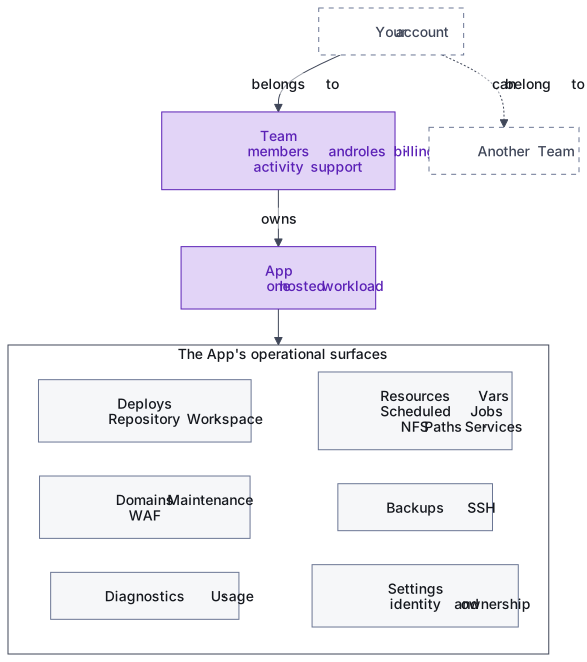
synsmarts organizes customer work at three levels: your account, a Team, and the Apps owned by that Team.
Teams own shared work
Section titled “Teams own shared work”A Team is the workspace that owns Apps, members, billing, activity history, and support requests. Team roles determine which people can change shared settings or operate an App.
An account can belong to more than one Team. Select the Team first, then select the App you want to operate.
Apps are the operational boundary
Section titled “Apps are the operational boundary”An App is one hosted workload. Its Framework describes the software stack, such as WordPress, WooCommerce, Magento, Laravel, or Shopware.
Each App has its own operational surfaces:
- Deploys connects code and records releases.
- Domains, Maintenance, and WAF control how traffic reaches the App.
- Diagnostics and Usage show health, investigations, and resource use.
- Resources, Vars, Scheduled Jobs, NFS Paths, and Services control the App’s runtime configuration.
- Backups and SSH provide recovery and managed access.
- Settings controls the App’s identity and ownership actions.
Git and Workspace supply code
Section titled “Git and Workspace supply code”A GitHub repository can supply a branch, tag, or commit. The managed Workspace can supply the server-side files currently prepared through SSH or file transfer. A Deploy is the recorded operation that validates configuration, prepares the selected source, and applies the result to the App.
Use the Deploys page to start the first deploy and inspect later deploys. Each deploy has its own detail page so a failure can be investigated without starting a replacement operation.
See Git and Workspace deploys for how the sources interact, then Deploy from Git or Workspace to start a release.
synsmarts manages the service layer
Section titled “synsmarts manages the service layer”The portal exposes the services provisioned for an App and the settings that customers can change. synsmarts manages the underlying hosting environment, while you control your code, customer-facing configuration, access, domains, and release decisions through the portal.
New Apps start on the latest compatible published stack. synsmarts stores the exact application and service versions selected for each App, so retries and later code deploys keep that stack until you choose a different supported version. The current fresh Magento stack is Magento Open Source 2.4.8-p5, PHP 8.4, MariaDB 11.4, Valkey 9.1, and OpenSearch 3.7.
Recovery and support stay attached to the App
Section titled “Recovery and support stay attached to the App”Backup history, diagnostics, deploy history, and SSH access are scoped to the affected App. Support is Team-scoped so one request can identify the App and the exact deploy, backup, or diagnostic operation involved.