

How deploys move from code to traffic
A deploy turns a selected Git revision or captured Workspace into an immutable release image. synsmarts validates and builds that image, handles any Magento or Shopware database changes, starts the replacement separately, and moves traffic only after the replacement is ready.
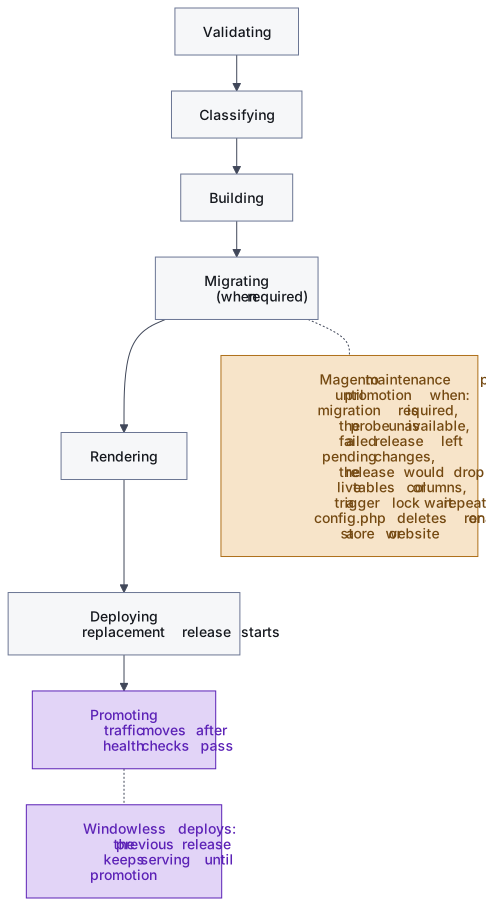
The main stages
Section titled “The main stages”Every deploy progresses through customer-visible phases:
- Pending waits to start.
- Validating checks the requested source and App configuration.
- Classifying determines whether database changes need special handling.
- Building prepares the runnable release.
- Migrating applies database changes when required.
- Rendering prepares the target configuration.
- Deploying starts the replacement release.
- Promoting moves traffic after health checks pass.
- Cleaning up removes temporary release resources.
Not every deploy reaches every phase. A WordPress release skips Migrating; Magento and Shopware releases pass through it on every path because their release Job runs then. The deploy finishes as Complete, Failed, Restore failed, Cancelled, or Superseded.
What zero downtime means
Section titled “What zero downtime means”For a code-only release, synsmarts starts the replacement beside the currently serving release. The replacement must become ready before promotion. If validation, build, synchronization, or rollout checks fail before promotion, the previous release keeps serving.
For a proven additive Magento migration, the previous release also keeps serving while the compatible database expansion runs and while the replacement starts. This path has no planned interruption and doesn’t intentionally return a maintenance page.
Zero downtime doesn’t mean zero observable effect. A live additive DDL
operation can briefly wait for a MySQL metadata lock, and Magento can rebuild
caches after setup:upgrade. synsmarts checks three times for transactions
older than 30 seconds before live DDL and fails the deploy if they persist.
The switch itself doesn’t strand pages a visitor already loaded. Magento’s web server carries the previous release’s static files beside the new ones, so a page that still references the previous static-asset version keeps loading its styles and scripts after traffic moves.
Static classification can’t prove that breaking or unclassifiable Magento changes are safe against one shared database. A status probe checks the live schema before a notified maintenance window begins. A clean schema promotes without the window or notification; migration-required and probe-unavailable results use the existing windowed path.
How Magento database changes are detected
Section titled “How Magento database changes are detected”Magento uses two static checks plus a runtime check, then proves every release before traffic moves. WordPress doesn’t use this classifier. Shopware uses its own static comparison, described below.
1. Detect whether migration-bearing files changed
Section titled “1. Detect whether migration-bearing files changed”For Git deploys, synsmarts compares the currently serving commit with the resolved candidate commit. The comparison is against immutable commit SHAs, even when the customer selected a branch or tag.
The deploy is migration-bearing when the change includes a known carrier such
as composer.json, composer.lock, db_schema.xml,
db_schema_whitelist.json, module.xml, app/etc/, Setup/, Patch/,
theme.xml, a theme’s registration.php, or a module’s message-queue,
indexer, or mview declarations (queue*.xml, communication.xml,
indexer.xml, mview.xml). When none of those paths changed, the deploy is
code-only. A change limited to theme files or those declarations takes the
additive path: setup:upgrade runs while the previous release keeps serving,
with no schema change to apply.
For Workspace deploys, the snapshot producer calculates a Workspace schema
fingerprint from the same migration-bearing paths. When that fingerprint
matches the currently serving Git commit, the deploy is code-only. A missing
Git baseline, a fingerprint mismatch, or a .deployignore file makes the
result unknown rather than guessing that it is safe.
2. Classify the built Magento release
Section titled “2. Classify the built Magento release”When migration-bearing files changed, synsmarts builds the candidate image and
compares its post-build schema inventory with the serving image. This
catches Composer-installed modules under vendor/, which a repository diff
can’t see.
The inventory includes:
- the schema declaration Magento resolves from the release’s enabled modules, recorded when the image is built;
db_schema_whitelist.jsonfiles;- content fingerprints for PHP under
Setup/andPatch/.
When either image was built without a recorded declaration, the comparison
merges the images’ db_schema.xml files instead.
The comparison follows what MySQL must do to apply each change. Added tables,
nullable or defaulted columns, non-unique indexes, and a varchar widened
without crossing 255 bytes in the table’s character set apply without copying
the table, so they can be classified as additive. Changing a column’s data
type, such as int to bigint or a varchar growing past 255 bytes, makes
MySQL rebuild the table, so it receives breaking treatment. So do drops,
renames, other changes to existing columns or constraints, whitelist-only
changes, and changed Setup or Patch PHP. By default, additive DDL against a
table estimated above 1,000,000 rows also receives breaking treatment. If either image inventory
or the database-size check is unavailable, classification remains unknown and
routes to the status probe rather than being treated as safe.
3. Check the live database before changing it
Section titled “3. Check the live database before changing it”The runtime check runs from the new image. An additive candidate’s release Job
first asks Magento what setup:upgrade would change in the live database.
Anything beyond the additive changes above moves the deploy to the
maintenance-window path, for example dropping a disabled module’s tables or a
column another module marks disabled="true". Breaking and unknown candidates use
a separate setup:db:status probe before notification, maintenance,
scheduled-work pause, or the real migration Job. If Magento reports that the
database is already current, the deploy is a no-op and promotes without a
maintenance window or notification.
When migration is required or the probe is unavailable, the deploy enters the existing notified maintenance window. The managed migration Job runs:
bin/magento setup:db:statusbin/magento app:config:import --no-interactionbin/magento setup:upgrade --keep-generatedbin/magento setup:db:statusDon’t run this production migration manually. The managed Job is tied to the deploy record, backup, maintenance state, and rollback-safety flags.
4. Prove the release before traffic moves
Section titled “4. Prove the release before traffic moves”Every Magento deploy runs a release Job on the new image before traffic moves,
code-only deploys included. Classification decides whether that Job applies
schema changes; the Job’s other checks run on every path. It refuses a database
whose schema is newer than the release’s code, which happens when a deploy
selects code older than the last migration applied. It imports the
release’s committed configuration with bin/magento app:config:import,
registers themes, and then serves the storefront from the new image inside the
Job, requesting each store’s home page, one product page, and one category
page. An error status or Magento’s error page fails the deploy, and the
previous release keeps serving. The Job uses its own short-lived caches, so it
never writes the caches the serving release reads.
A code-only Magento release takes no backup and no maintenance window. Two
conditions move a deploy onto the maintenance-window path instead: a database
that still holds pending changes from an earlier failed release, and a
committed config.php that would delete or rename an existing store or
website. In both cases the deploy takes a fresh backup once the maintenance
page is up.
How Shopware database changes are detected
Section titled “How Shopware database changes are detected”Every Shopware build records a migration inventory beside the release image.
It holds the list of migration classes in the built tree, a digest of
composer.lock, and a digest of the effective .shopware-project.yml.
synsmarts compares the candidate’s inventory with the serving release’s. An identical
inventory deploys as code-only. Any difference, or an inventory that can’t be
read, takes the breaking path with its maintenance window, because Shopware
migrations can’t be proven additive from their source.
On both paths, a release Job runs on the new image before traffic moves and
ends with two checks. Shopware’s system:check --context=pre_rollout checks
the Administration and core services. The Job then requests each active
storefront’s home page, one product page, and one listing page from the new
release over HTTP; a storefront with no visible in-stock product or product
listing skips that request. Shopware’s own storefront checks are left out
because they render pages inside one command-line process, where a page that
serves correctly can still fail. A failed check keeps the previous release
serving. Before those checks, a code-only deploy’s Job only compiles the theme. A deploy that takes
the maintenance window runs Shopware’s Deployment Helper
(shopware-deployment-helper run) first, which applies migrations, refreshes
plugins and apps according to the deployment.extension-management section of
your .shopware-project.yml, and compiles the theme.
What happens on each deploy path
Section titled “What happens on each deploy path”| Path | Database behavior | Traffic behavior |
|---|---|---|
| Code-only | No pre-migration backup or schema change. Magento and Shopware still run their release Job. | The old release serves until the replacement is promoted. No planned interruption. |
| Additive | Take a pre-migration backup, pause scheduled work, and run the migration from the new image. | The old release keeps serving. No planned interruption. |
| Breaking | Run a status probe. A clean schema skips the backup and the real migration Job; migration-required and probe-unavailable results take the backup inside the maintenance window, then run the Job. | A clean schema promotes with no maintenance window or notification. Otherwise customers receive the maintenance page until promotion. |
| Unknown | Use the same probe-first execution as breaking because static compatibility couldn’t be proved. | A clean schema promotes with no maintenance window or notification. Otherwise customers receive the maintenance page until promotion. |
The maintenance notification is sent only when the probe doesn’t prove the schema is clean and the deploy enters the window. The notification is informational; the deploy doesn’t pause for approval after it starts.
How migration failures recover
Section titled “How migration failures recover”Every non-code-only Magento or Shopware path takes a dedicated pre-migration backup before the migration Job can start. A Shopware code-only deploy whose release Job fails keeps the previous release serving and changes nothing. A Magento code-only deploy whose release Job fails also keeps the previous release serving; that path took no backup, so nothing is restored.
An additive migration runs while the previous release accepts writes. Therefore an additive failure is not restored from the pre-migration backup: restoring would discard valid writes made during the attempt. The deploy fails, the previous image remains live, scheduled work resumes, and the schema changes and data patches that completed before the failure stay applied. Deploy details list them. Deploy the same source again to finish; synsmarts applies only what is still pending. That failed deploy can’t be rolled back.
One live-path failure is retried. Magento recreates its indexer triggers on
every setup:upgrade, and live writes can briefly hold a lock that step needs.
When a lock wait on those triggers is the only failure and no schema change or
data patch was recorded, the Job runs setup:upgrade once more after five
seconds. A second such wait moves the same deploy onto the maintenance-window
path, where live traffic no longer competes for that lock.
Before the first database change, the migration Job (and the status probe) writes and deletes one test object in media storage. If that fails, the deploy stops before any database change. After the migration, and even when nothing needed migrating (the status probe included), the Job registers themes, so a theme added in the release appears without a manual step. An additive candidate whose database still holds pending changes from an earlier failed release uses the maintenance-window path with a fresh backup taken once the maintenance page is up. When synsmarts can’t determine which changes a failed migration applied, deploy details say so and support is notified before you deploy again.
When a breaking or unknown candidate needs migration, synsmarts first stops scheduled work, including queue consumers, and waits until the maintenance page is what visitors receive. Only then does it take the pre-migration backup and run the Job, so the backup holds every order, account and integration update the store accepted. If the Job fails before promotion, synsmarts stops it, keeps a copy of the failed database, restores the pre-migration backup, returns the previous release to service, and marks the deploy failed. Nothing the store accepted is lost.
Promotion protects the active release
Section titled “Promotion protects the active release”After database handling, synsmarts renders the replacement configuration, synchronizes it, waits for the preview release, and explicitly promotes it. Traffic doesn’t move merely because a build or configuration commit succeeded.
A Magento release must also pass a preview check before promotion. Its home page and the product page the release Job found are requested through the preview route, and each must end at HTTP 200 within 45 seconds. The check follows up to five redirects, each only to one of the app’s own domains, so a home page that redirects to your www base URL passes. Any other status, such as a 401 from a password-protected home page, or a redirect to another host fails the check. A configuration-only change checks the home page alone. A failed check stops the promotion, and the previous release keeps serving.
After promotion, Magento’s configuration cache is flushed, its application caches are cleaned, Varnish is purged when it’s enabled, and the storefront is warmed for up to a minute. The deploy reports Complete without waiting for that work, and a failure in it doesn’t change the result. Expect the first requests after a Magento deploy to be slower while caches refill.
Rollback depends on data compatibility
Section titled “Rollback depends on data compatibility”A code-only or additive rollback promotes the previously built immutable image without rereading Git or Workspace and without restoring the database.
After a successful breaking or unknown migration has served traffic, the prior image and current database may no longer be compatible. Any rollback that could discard newer customer data requires an explicit data-impact decision; synsmarts doesn’t infer consent from silence.
A Magento or Shopware rollback re-runs the release Job on the prior image
first, without applying migrations, so the prior release proves it can serve
the current database before traffic moves. A Shopware rollback refuses when
the deploy being rolled back changed the database; a Magento rollback refuses
after a breaking or unknown migration. On Magento, the rollback Job imports
the prior release’s committed configuration, so settings defined in its
config.php return to their prior values. It refuses when that file would
delete or rename a store or website that exists now.
For procedures, see Manage deploys and Roll back a deploy.