

How usage becomes cost
An App’s bill has a predictable reserved-resource base and a smaller set of events that can change the amount for a service month.
The purchased shape is the base
Section titled “The purchased shape is the base”The purchased shape has five priced dimensions:
- CPU cores;
- memory;
- MySQL storage;
- workspace storage;
- media storage.
An App with a provisioned RabbitMQ message broker also pays for its storage as part of the same base, including while the broker is suspended.
The price is calculated from those confirmed quantities, not from a marketing plan name and not from average utilization. A named plan is a preset or derived display label; the purchased quantities are the commercial record and the resource envelope enforced for the App.
Every base charge, storage included, follows the subscription’s active time in the month. A full month bills each purchased quantity in full; a subscription that starts mid-month, or is cancelled with Cancel now, pays only for the minutes it was active. The Usage page presents the current shape as a monthly plan base so it can be compared with current month-to-date variable charges. An annual plan prepays that base for 12 months at 10% off; burst overage is priced from the undiscounted rate and still bills monthly.
How usage is measured
Section titled “How usage is measured”Only one part of the bill follows actual consumption, and the platform measures it a minute at a time. A minute is fine enough to catch a short spike and coarse enough to keep the bill readable. Once a minute, synsmarts adds up the real CPU and memory of the App’s billed containers and subtracts the App’s purchased base. Whatever sits above it is that minute’s burst. Those per-minute readings accumulate across the billing window, and the burst part of the bill is figured from them.
The base and storage aren’t sampled this way. They bill the purchased quantities for the time the subscription is active, whatever the App actually uses. Only burst is metered from actual use. That’s the split behind the Usage page’s numbers: a fixed base you pay no matter what the App does, and a metered burst that follows what it actually did.
Utilization doesn’t reduce the reserved base
Section titled “Utilization doesn’t reduce the reserved base”Observed CPU and memory answer whether the App is right-sized. They don’t replace the reserved shape as the base billing quantity.
An App that reserves 2 CPU cores and averages 0.5 cores still pays for the 2-core reservation. The lower usage may support a future downsize, but it doesn’t retroactively change the current purchase.
Likewise, moving CPU or memory between editable containers inside the same purchased shape doesn’t change the plan base. It changes how the App uses the capacity already purchased.
Burst is the variable compute charge
Section titled “Burst is the variable compute charge”Burst is the App’s total CPU or memory consumption above its purchased shape. A container’s configured request places it on a node and anchors its CPU burst control; it isn’t a separate billing baseline. CPU and memory are evaluated independently.
Each editable App container has a CPU burst control:
- Off: the container’s CPU request is a hard ceiling.
- Capped: CPU can exceed the request up to the selected cap.
- Unlimited: no customer-selected limit bounds CPU.
When every container you control is Off, each of them is held to its CPU request. Memory has no burst control. Services keep their reserved memory, and web and other dynamic containers share the App’s unreserved memory, so memory use above the base can still accrue burst while CPU burst is off.
The burst setting doesn’t change the purchased shape or its base price.
Scheduled Jobs reserve no plan capacity, so their CPU and memory use lands on the metered plane. Extra copies created during sustained overflow also run outside the plan reservation and are metered while they run, like any other use above the purchased shape. Never spend more than my plan and a spending limit keep PHP at the copies the plan includes.
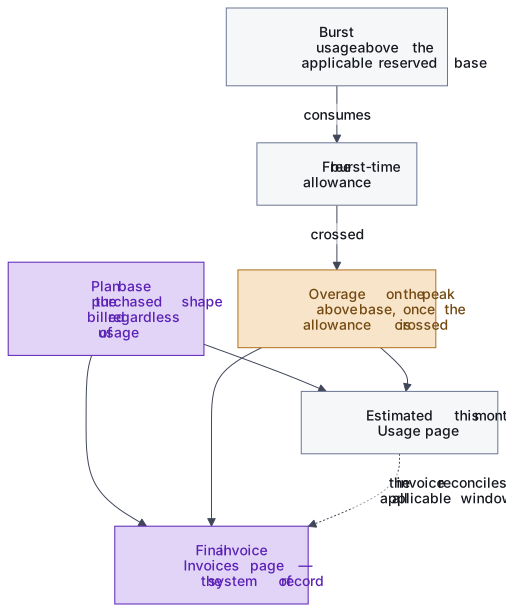
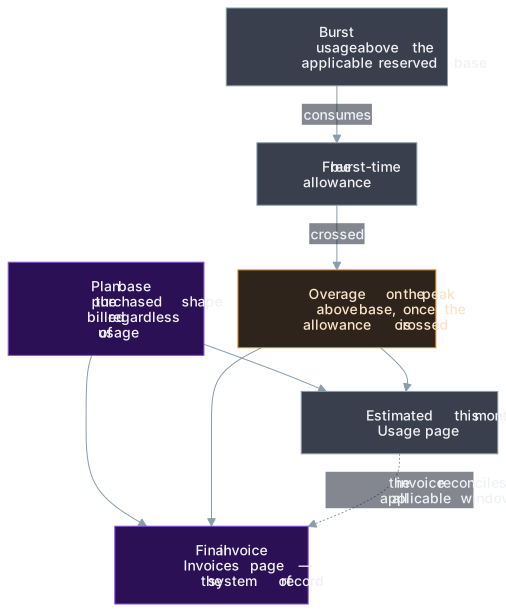
Usage above the base is free while it remains inside the displayed burst-time allowance. Once a dimension exceeds its allowance, a 2x overage applies to the peak above the base for that billing window. This is a cliff, not a graduated per-minute surcharge.
Because CPU and memory have separate gates, one dimension can incur an overage while the other remains free.
A worked example
Section titled “A worked example”Take an App with a purchased shape of 2 CPU cores and 4 GiB memory, with the web runtime requested at the full shape so request and shape coincide here. The plan base bills those quantities for the whole month, whatever the App actually uses — that part of the bill never moves.
- A quiet month. Usage stays at or under the base on both dimensions. Burst time is zero, and the bill is the plan base.
- A short spike. A sale pushes CPU to 3 cores for two hours. Those two hours count against the free burst allowance — 10% of the month’s minutes, roughly 72 hours in a 30-day month — and two hours is nowhere near it. No extra charge; the allowance indicator on the Usage page ticks up.
- Sustained pressure. CPU runs above the base for 100 hours this month. The first ~72 hours consume the allowance; crossing it triggers the overage, charged at twice the subscription’s retained per-unit rate on the peak above the base for the whole window — not only the hours past the allowance. If the peak was 3 cores, the overage is priced on the 1 core above base — the 2-core base itself is never re-billed.
- Memory stays free. Memory never went above 4 GiB, so it incurs nothing. The gates are independent; a CPU overage says nothing about memory.
- CPU burst Off is a ceiling. Set CPU burst to Off on every container and the web runtime is throttled at its 2-core request during the sale, so pages slow down instead of using more CPU. Memory above the base is still metered. Size requests for the heaviest traffic you expect before turning CPU burst off.
The allowance is a time budget, not a volume budget: 100% of allowance means the free burst time is used up, not that the App burst all month. The overage is a cliff: free while the allowance holds, then 2x on the peak above base for the whole window once it’s crossed. A workload that hovers slightly past the gate therefore costs far more than its average utilization suggests.
A shape change doesn’t erase earlier burst
Section titled “A shape change doesn’t erase earlier burst”When the CPU or memory base changes during a service month, synsmarts evaluates the time before and after the change against the base that was active in each window. An upgrade late in the month doesn’t retroactively absorb burst that occurred under the earlier, smaller base.
Each window receives its own proportional allowance and overage calculation. The Usage page emphasizes the current allowance; the final invoice reconciles all applicable windows.
The allowance indicator restarts against the new window after a base change, so a reset doesn’t mean earlier burst was forgiven. A second base change made within one day of the previous one is absorbed into the current window rather than opening another.
Storage growth changes the purchase
Section titled “Storage growth changes the purchase”Used storage and purchased storage are different:
- Used storage is the amount of data currently measured.
- Purchased storage is the provisioned capacity and billing quantity.
Deleting files or database rows can reduce used storage, but it doesn’t shrink the purchased volume.
A MySQL or workspace expansion is a plan change, whether you request it or automatic expansion performs it. Automatic expansion is enabled by default and can be disabled per storage dimension.
An expansion increases the purchased dimension in 25 GiB blocks and creates the same prorated adjustment as a manual upgrade. Purchased storage can’t be reduced afterwards, either through self-service or by contacting support. Plan for growth and set the expansion ceiling deliberately. Media storage doesn’t use this volume auto-expansion control.
Automatic expansion grows one block at a time and stops at a ceiling. Unless you set the ceiling yourself, it defaults to twice the purchased size and is re-derived if you later upgrade past it. The ceiling is never silently exceeded: at the ceiling, expansion is skipped and you are emailed to raise it. Every automatic expansion also emails you the new size and monthly cost. Change the ceiling or turn expansion off in Manage resources.
Existing subscriptions retain their rates
Section titled “Existing subscriptions retain their rates”At purchase, synsmarts snapshots the effective per-unit rates for the subscription. A later list-price change doesn’t silently reprice that subscription.
A shape change changes quantities at the subscription’s retained rates. A new subscription uses the rates effective for its new consent. An explicit rate migration requires its own customer-facing process; it isn’t inferred from a plan label or resource edit.
The Save per month amount in a right-sizing recommendation is an estimate using the rates currently available to the portal. The invoice applies the subscription’s retained rates.
Billing surfaces show different amounts
Section titled “Billing surfaces show different amounts”The Usage and Invoices pages answer different questions:
| View | Surface | Meaning |
|---|---|---|
| Your plan | Usage | Firm monthly base for the current reserved shape. |
| Estimated this month | Usage | Plan base plus burst overage incurred so far on a healthy burst read. |
| If this pattern holds | Usage | Advisory month-end burst projection, not a current charge. |
| Upcoming adjustment | Invoices | Prorated charges and credits accumulated for a later invoice. |
| Final invoice | Invoices | Generated line items, adjustments, payments, credits, taxes, and state. |
If burst data is unavailable, the Usage page keeps the firm plan base and says that burst is missing. It doesn’t display a confident zero.
An upcoming invoice row can show the net effect of plan-change charges and credits before the invoice is generated. No card transaction occurs merely because an upcoming placeholder exists.
Spend caps alert; they don’t stop charges
Section titled “Spend caps alert; they don’t stop charges”A spend cap is a per-App monthly dollar threshold that you set. Notification bands are fixed at 50%, 80%, and 100% of that threshold. The cap never throttles the App, disables burst, pauses storage growth, or stops charges. It is an alert only.
Use the App’s burst controls and storage auto-expansion settings to change cost exposure, but apply those controls safely. Setting CPU burst to Off makes the CPU request a hard ceiling; lowering an expansion ceiling increases the risk that a volume fills. Treat the final invoice as the system of record for the completed service month.
See Review usage, Manage resources, Manage billing, and Review invoices.