

Configure services
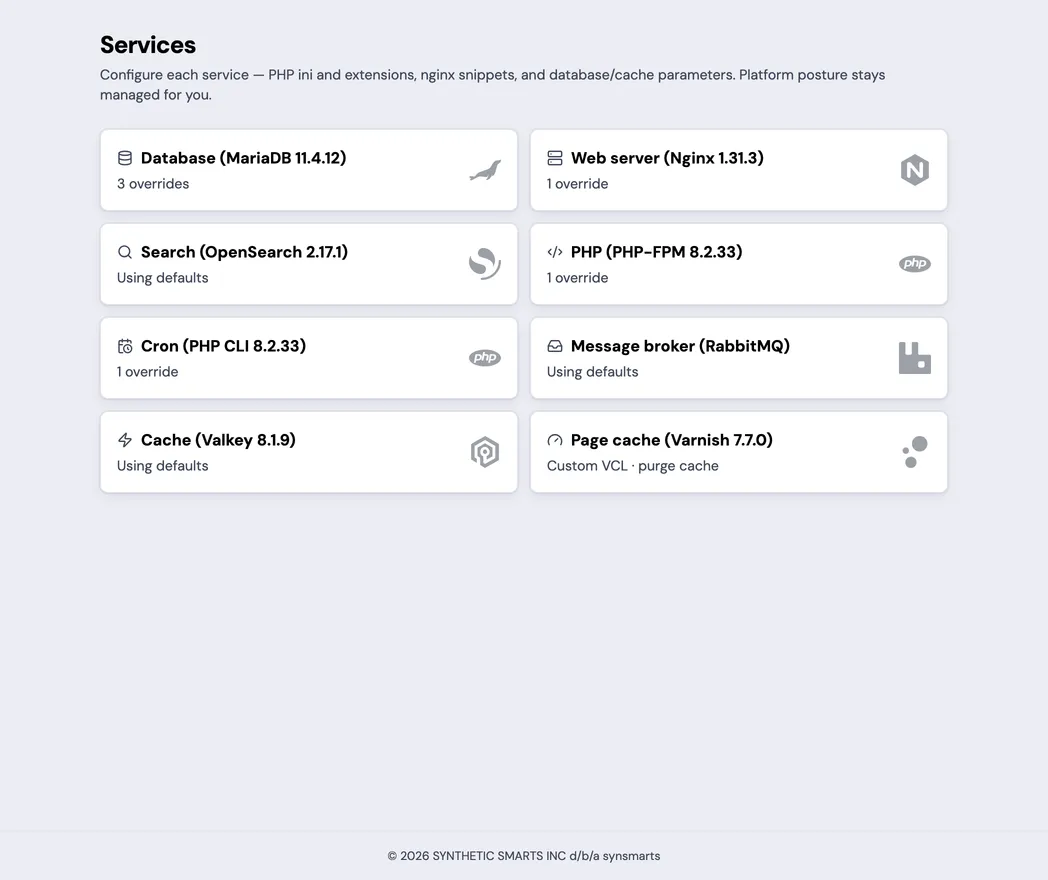
Open an App and select Services. The index lists the App’s service cards. When a service isn’t enabled, its card is greyed and says Not enabled for this app.
Only Team owners and admins can change service configuration or purge the Varnish cache.
Each configurable service card shows its role, technology, version when available, and either Using defaults or the number of customer overrides. Common cards include:
- PHP (PHP-FPM) for web requests.
- Cron (PHP CLI) for scheduled jobs.
- Web server (Nginx).
- Database (MariaDB), the App’s MySQL-compatible database.
- Cache (Valkey or Redis).
- Message broker (RabbitMQ).
- Search (OpenSearch).
- Page cache (Varnish).
Edit a service
Section titled “Edit a service”- Select the service.
- Review the effective values and their source.
- Change the service version when a version picker is available.
- Change only registered settings exposed by the portal.
- Review inline validation and the previewed apply impact before you save.
- Select Save changes.
- In Apply changes to service?, review the impact and confirm.
- Follow the resulting operation until it completes.
synsmarts validates supported settings before committing them. Configuration that fails a service’s native validation is rejected instead of being applied to the running App.
Configure services through MCP
Section titled “Configure services through MCP”Use a Control connection with config.read and config.write:
- Call
get_site_configurationfor an App returned bylist_apps. - Retain the returned
revision_token. - Call
configure_serviceswith at least one of theservices,resources,jobs, orconfigfields you want to change. - Include the revision token, an idempotency key, and confirmation.
- Follow the returned deployment ID with
deploy_status.
get_site_configuration returns a bounded projection for automation. Core
fields include the App and environment, purchased shape, resources, services,
versions, configuration apply state, pending Vars or code, envelope status,
bounds, and revision_token. service_config contains each effective parameter
value without the portal’s registry form metadata.
The MCP response intentionally omits running_config, version_options, and
other UI-only sections. Use the portal’s Running configuration section when
you need the live readback described below.
A stale revision fails without committing the requested edit. Read the current configuration again, review any intervening change, and submit a new request with the new token.
Reapply committed configuration
Section titled “Reapply committed configuration”Use a reapply when the committed configuration is already correct but the running services haven’t converged to it. This operation reads and validates the existing platform-managed file; it doesn’t edit that file and doesn’t require a revision token.
Through MCP, call reconcile_configuration with an idempotency key and
confirmation. Set force to true when the recorded applied projection is
already current but the running services still differ. Follow the returned
deployment ID with deploy_status.
From a CLI configured with an admin-scope API key, run:
synsmarts deploy config-reconcile <app-id> --force --yesUse the non-forced form first when the configuration state is already marked pending or degraded. A non-forced request returns without a deployment when the projection is already recorded as current.
Understand the available settings
Section titled “Understand the available settings”The exact controls depend on the App and service:
- PHP-FPM has its own version and extensions pickers and can expose memory, request duration, upload, and socket settings for web requests.
- PHP-CLI has independent version and extensions pickers and can expose memory and socket settings for Scheduled Jobs.
- Nginx can expose validated server or location snippets and, through Add setting, catalog directives; a directive Nginx accepts more than once takes one value per line.
- Database (MariaDB) can expose SQL mode, packet size, idle timeout, and slow-query threshold settings.
- Valkey or Redis can expose the cache eviction policy. Session storage remains platform-managed.
- OpenSearch shows its effective managed configuration and the Rebuild search index action.
- Varnish exposes its vetted 40-setting Varnish 7.7 catalog through Add setting, plus its existing cache controls and Purge cache action.
Settings that control platform security or reliability aren’t editable. Settings whose default is derived from your purchased resources are editable — the derived value is a starting point, not a ceiling.
Change a service version
Section titled “Change a service version”PHP-FPM, PHP-CLI, the MySQL-compatible database, the Redis-compatible cache, and
OpenSearch show a version picker when the App supports a customer-selectable
version. PHP-FPM and PHP-CLI use full x.y.z versions, are validated
independently, and may differ; each card also offers extensions compatible with
its selected version. For example, 8.3.30 is a WordPress PHP catalog key and
8.4.23 is a Magento PHP catalog key. Selecting a cache version also selects
its matching implementation, such as Valkey or Redis. Nginx remains
platform-managed.
Changing a version redeploys that service. Review compatibility with the App before confirming the change.
Understand defaults
Section titled “Understand defaults”See Value sources and locks for the four labels shared by service badges and the running-configuration file.
An effective value can come from the platform default or an App override. Removing an override returns the setting to the current platform default; it doesn’t preserve the old default forever.
Each editable field is marked Default or Custom. When a concrete baseline exists, the field also shows Default: value. Shape-derived defaults can change when the App’s purchased resources change.
Select Reset to default beside a custom setting to remove its override. Review the resulting value before saving. Returning a field to its displayed default is still a change and must be saved to remove the old override.
Review the running configuration
Section titled “Review the running configuration”The Running configuration section is read-only and can be copied for troubleshooting. It includes the effective values and their source while redacting sensitive data.
When a rollout is pending, the view can include the newly saved configuration before every running service has adopted it. Use the apply status as the source for rollout completion.
Understand apply impact
Section titled “Understand apply impact”- PHP web-runtime and Nginx changes use a health-checked replacement. Traffic moves only after the replacement is healthy.
- Database and cache changes restart the stateful service behind a temporary maintenance page, usually for less than a minute. Scheduled jobs stop before the page goes up: a running job gets up to 30 minutes to finish, and a run due while the scheduler is stopped is skipped. Scheduling resumes after service health is confirmed. See When a restart meets a running job.
- PHP command-line changes restart the scheduled-job runner while the serving App remains online. A running job gets up to 30 minutes to finish before the runner restarts, and upcoming runs continue on schedule.
- Varnish parameter and custom VCL changes replace the page-cache pod without the maintenance page, and scheduled jobs keep running. The old pod serves until the new one is ready. The new pod starts with an empty cache that warms again from application traffic. Parameter values are read back live before the operation completes.
- Turning Varnish on or off moves the request path to or from the page cache, so it runs behind the temporary maintenance page with scheduled jobs stopped, as for a database change. The page lifts once the page cache is ready or removed.
- OpenSearch memory and version changes replace the search node and rebuild the catalog index from the database. A rebuild usually takes minutes, and a catalog of several hundred thousand products can take up to about an hour. On Magento 2.4.7 or later using Magento’s built-in OpenSearch search, category and search pages start empty and fill as the rebuild progresses. On other Magento setups, they return when the rebuild finishes. Shopware keeps serving from the database until the rebuild finishes. If the rebuild fails, the change reports failed with the new size or version still applied. On Magento 2.4.7 or later using the built-in OpenSearch search, the catalog search indexer also stays paused until a rebuild succeeds.
- A no-change save doesn’t restart a service.
Verify an apply
Section titled “Verify an apply”The service page shows Saving… and Saved — applying your changes… while the operation runs. The form remains disabled until the apply finishes or the page presents a recovery action.
When complete, review the Running configuration view and test the App path affected by the change.
For a database or cache change, also confirm that scheduled jobs resume. For a PHP or Nginx change, test a request that exercises the changed setting.
Purge Varnish
Section titled “Purge Varnish”For a Magento or Shopware App with Varnish enabled, select Purge cache to invalidate the full-page cache. The purge is a separate runtime action and doesn’t change the saved service configuration.
synsmarts configures the framework to use Varnish when the App is provisioned with it. Enabling Varnish later creates the reverse proxy but doesn’t rewrite Magento or Shopware configuration. Complete the matching setup under Varnish (page cache) before relying on cache invalidation.
Rebuild the search index
Section titled “Rebuild the search index”For a Magento or Shopware App with OpenSearch enabled, select Rebuild search index on the Search service page to rebuild the catalog index from the database. The rebuild is a separate runtime action and doesn’t change the saved service configuration.
The Resources page shows the rebuild’s progress. For Magento, an index that still holds products keeps serving until the rebuild replaces it. An empty index fills as the rebuild progresses on Magento 2.4.7 or later using Magento’s built-in OpenSearch search; on other Magento setups, it serves again when the rebuild finishes. For Shopware, rebuilt search results appear when the rebuild finishes. Run it after a rebuild that failed, once you’ve addressed the cause, such as an OpenSearch reservation too small for the catalog. On Magento 2.4.7 or later using the built-in OpenSearch search, a failed rebuild pauses the catalog search indexer so Magento’s cron doesn’t retry it, and a successful rebuild resumes it.
Recover from a problem
Section titled “Recover from a problem”If the service catalog is temporarily unavailable, the page says Configuration editing is temporarily unavailable. The App’s already-applied configuration continues to run. Wait for the catalog to recover before making new changes.
- Correct highlighted validation errors before saving.
- If the requested service says Service not found, return to Services. The App doesn’t currently have that configurable service.
- If the revision is stale, load the latest configuration and repeat the edit.
- If another operation is active, wait for it to finish.
- A rejected save applies nothing, including a version already selected in the form. Load the latest configuration before trying again.
- If an apply stepped aside for another App change, select Load the latest and review the current configuration.
- If an apply fails or its status can’t be confirmed, select Load the latest before retrying.
- If a Varnish purge fails, retry after the portal’s suggested delay. Contact support if the failure persists.
- If an OpenSearch change reports failed because the index rebuild failed, the new size or version is already running. Fix the cause, then select Rebuild search index. See Index rebuilds for sizing the reservation.
- If an OpenSearch change fails with the reason OpenSearch change refused before the search node was replaced, the existing node and its index keep running unchanged. The reason lists the settings or data that need a plugin the target OpenSearch image doesn’t include. Contact support. See OpenSearch.
- If a database or cache apply fails, synsmarts checks the service’s health again before restoring traffic. When the service is healthy, the maintenance page comes down and Scheduled Jobs resume, and the apply still reports failed with its reason. A setting the restarted service doesn’t read back as requested is restored to its previous value, so review the reason before you save it again.
See Service configuration fields for the customer-editable parameter catalog, exact ranges, defaults, and running-configuration states. For framework-specific compatibility and verification, see Operate WordPress or Operate Magento.