

How domains, traffic controls, and the WAF fit together
Domains identify where customers reach an App. Traffic controls determine whether a request reaches the App normally, receives a maintenance response, or is blocked by a web application firewall rule.
Domain ownership comes first
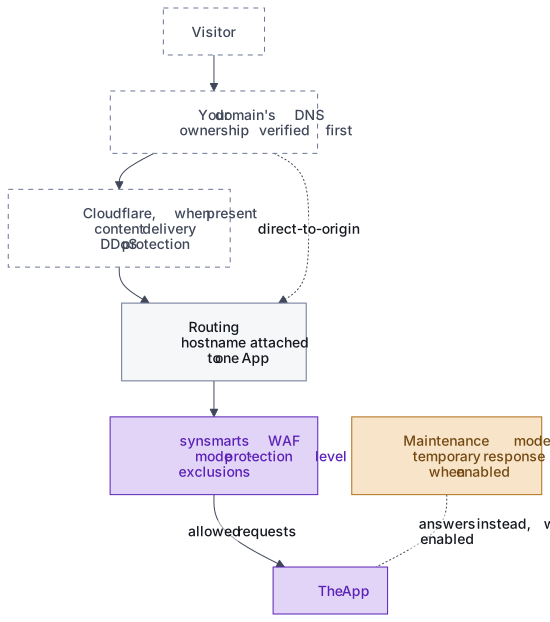
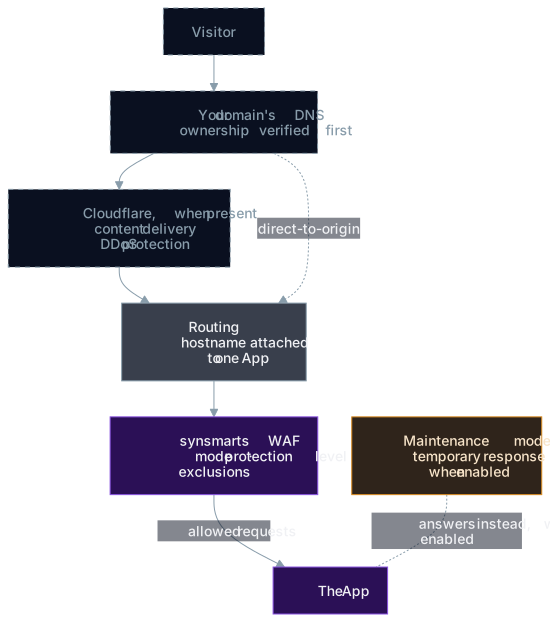
Section titled “Domain ownership comes first”Before synsmarts can serve a hostname, the Team must prove control of the required DNS records. The portal shows the expected values and verification state.
Certificate readiness and DNS readiness are separate steps because the certificate depends on DNS. When a domain keeps its own DNS host, the certificate authority checks control by reaching the domain over the public internet, which only lands on synsmarts after the domain’s DNS points here. DNS comes first, and a short window where DNS points but the certificate isn’t ready is expected. When a domain uses delegated DNS, ownership is proven by the nameserver delegation, and the serving certificate follows once the delegation completes. In both modes, a valid traffic record doesn’t replace ownership verification, and a verified domain shouldn’t receive production traffic until its certificate is ready.
A domain can serve a certificate you upload instead of one synsmarts issues. synsmarts serves that certificate itself, so the domain reaches synsmarts directly rather than through Cloudflare. Use your own certificate covers the upload and its expiry.
Routing selects the App
Section titled “Routing selects the App”After verification, the hostname is attached to one App. Redirects and canonical-host behavior determine which hostname a visitor ultimately sees.
Changing DNS can take time because resolvers cache previous answers. Keep the old destination available during planned cutovers.
Maintenance mode sits in front of the App
Section titled “Maintenance mode sits in front of the App”Maintenance mode returns a temporary maintenance response without requiring the application code to be healthy. Use it for planned work that can’t safely accept normal traffic.
The platform can also use a temporary maintenance response during a managed stateful-service change. That platform maintenance sits on top of your own setting. While a database or cache restart holds the page, turning your maintenance mode off doesn’t lower it; the page comes down once synsmarts confirms the service is healthy. If your maintenance mode is on when the platform’s work finishes, the page stays up until you turn it off.
The WAF evaluates web requests
Section titled “The WAF evaluates web requests”The synsmarts WAF protects the App in every supported domain mode, including traffic that doesn’t pass through Cloudflare. When Cloudflare is present, it provides content delivery and denial-of-service protection; the App’s customer-configurable firewall policy remains with the synsmarts WAF.
The WAF applies the selected mode, protection level, path exclusions, and, where the domain mode supports them, geographic rules before allowed requests reach the App. Direct-to-origin domains don’t support geographic controls. Four protection levels are available. Standard is the default and recommended level for stores; stricter levels require progressively more false-positive tuning.
Detect records firewall-rule matches without blocking on those matches. Request-size controls, path rules, and enforced bot and geographic rules can still reject requests in Detect mode. Block enforces the configured firewall rules and is where a new Magento or WordPress App starts, and Off shifts WAF responsibility to your Team. The matching threshold is platform-controlled rather than a customer setting.
An exclusion narrows protection for the specified path; it doesn’t disable the WAF for the whole App. Review exclusions regularly and remove ones that are no longer required.
Recent events show attack rules by name so you can distinguish likely attacks from legitimate requests before adding an exclusion. Firewall enforcement rules remain visible when they fire but can’t be excluded.
See Manage domains, Manage maintenance mode, and Configure the WAF.