

How MCP access works
synsmarts exposes customer capabilities to AI clients and automation through three remote MCP servers. They are separate so observation, customer changes, and published documentation have independent permission and failure boundaries.
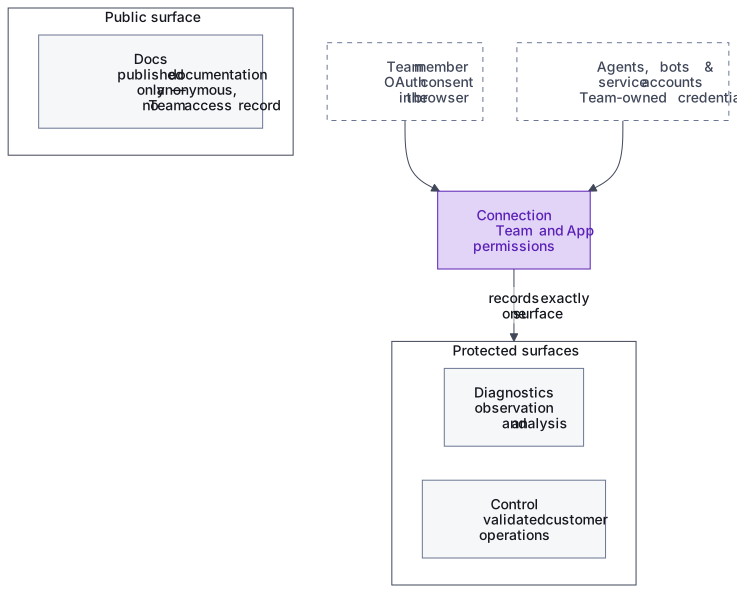
Three servers create hard capability boundaries
Section titled “Three servers create hard capability boundaries”Diagnostics provides observation and analysis. Control provides validated customer operations. Docs anonymously searches and reads only published customer documentation. Each server has its own origin, tool catalog, rate limits, and service boundary; only Diagnostics and Control have OAuth audiences.
Diagnostics and Control reject each other’s tokens before tool discovery. The split is stronger than filtering one shared catalog: Diagnostics has no control path, and Docs has no Team, App, telemetry, configuration, billing, or customer-content path.
People and machines have separate access paths
Section titled “People and machines have separate access paths”Each Team member starts with MCP access off. An owner or admin can enable a non-owner; only the owner changes the owner’s setting. Every person can turn their own access off. Once enabled, human access starts in Claude Code or Codex. OAuth discovery opens synsmarts in the browser, where the signed-in member selects a Team, Apps, and permissions. Approval creates an individually revocable connection and binds that token chain to it.
Role limits still apply at consent and on every call. Owners/admins can select allowed Team and App permissions. Developers can select App-scoped Diagnostics or Control, except the owner/admin-only App permission Manage the SSH IP allowlist. Billing members can select only Diagnostics billing read. The SSH permissions (Read SSH access, Manage SSH users, Manage the SSH IP allowlist) let a connected agent open and close its own shell access; see Manage SSH access.
Django and django-allauth are the customer OAuth authorization server. Claude Code identifies itself with a Client ID Metadata Document. Codex uses automatic Dynamic Client Registration for compatibility. Neither path grants Team access until browser consent succeeds, and neither asks the customer for a redirect URI.
Owners and admins create named machine access under Agents, bots & service accounts on the Team’s MCP access page. Machine clients use a Team-owned client credential whose secret is shown once. Rotation and revocation invalidate prior credentials; Keycloak remains internal-only.
A connection defines identity and reach
Section titled “A connection defines identity and reach”Protected MCP access uses a Team connection record rather than one credential per App. It records:
- the human connection or agent, bot, or service account using it;
- exactly one protected surface, Diagnostics or Control;
- Team-level permissions when needed;
- explicit App permissions or one wildcard permission set;
- lifecycle state for rotation, expiration, and revocation.
Explicit access is useful when a client should reach only selected Apps or needs different permissions per App. Wildcard access applies the same permissions to all current and future Apps owned by the Team. Docs needs no Team access record, login, or App permission because it serves only the same public documentation available on the website. Independent source-IP, operation-cost, and repeated-call limits protect the public service.
Discovery isn’t authorization
Section titled “Discovery isn’t authorization”tools/list and, on Diagnostics and Control, list_apps reduce what a client can see. Tool discovery
excludes operations the connection can’t use, while list_apps excludes Apps
the connection can’t resolve.
Discovery isn’t authorization. Every tool call is authorized again using the current connection, human eligibility and role where applicable, Team ownership, App access, permissions, and operation policy. Revocation, expiration, or an App transfer therefore takes effect without waiting for the MCP session to end.
API parity keeps behavior consistent
Section titled “API parity keeps behavior consistent”The portal, CLI, direct API, and MCP are peer clients of the same canonical operation. API parity means they share:
- input and output validation;
- Team and App authorization;
- idempotency, revision, confirmation, rate-limit, and cooldown rules;
- durable workflow dispatch and operation status;
- audit events, actor attribution, request IDs, and trace IDs;
- structured error behavior.
The clients don’t need identical menus. A capability may be absent from the portal or CLI presentation while still using the same API operation when published through MCP. MCP doesn’t contain a separate implementation of the business action.
Configuration has one authority
Section titled “Configuration has one authority”Any Control operation that changes customer-facing desired configuration updates the platform-managed App settings file first. The control plane then renders and applies the revision to the App.
The database and running environment are projections of that desired state, not alternative authorities. If the settings-file commit conflicts or fails, the operation fails without directly changing the database projection or cluster.
See How App configuration is applied.
Long-running work outlives the connection
Section titled “Long-running work outlives the connection”Deploys, restores, and configuration applies don’t depend on one HTTP stream remaining open. The canonical operation record owns status, progress, result, error, workflow correlation, and cancellation support.
MCP returns the durable operation identifier immediately. A client can reconnect and poll the same operation, and losing the MCP session doesn’t cancel the underlying work.
Results are bounded for agent use
Section titled “Results are bounded for agent use”Tool schemas are generated or checked against the API contract. Inputs use typed filters rather than arbitrary query languages, and large results use opaque cursor pagination.
Responses are bounded and redacted before they reach the client. Binary artifacts use access-checked downloads instead of being embedded in a tool result.
Customer data is data, not instruction
Section titled “Customer data is data, not instruction”Logs, traces, source code, and configuration may contain text that looks like an instruction to an AI model. synsmarts treats that content as untrusted customer data.
The MCP boundary validates structured inputs, applies response redaction, rate limits repeated work, and audits initialization, discovery, calls, denials, results, and access lifecycle events. It doesn’t expose shell execution, unrestricted file reads, arbitrary URLs, raw telemetry credentials, or direct infrastructure access.